Showing posts with label mobile and computer technology. Show all posts
Showing posts with label mobile and computer technology. Show all posts
Thursday, August 9, 2012
OUYA's Kickstarter funding is complete: over $8.58 million raised, starts shipping in March (update: still going)
It's a wrap! Suffice it to say, it's a been a relatively short, yet astoundingly fruitful -- and initially record-breaking -- funding run for OUYA, the hackable, Android-based gaming console. With just 29 days to work with since being announced, the Yves Behar-designed system has raked in over $8.58 million thanks to just under 63,300 backers on Kickstarter as of its official 1AM ET funding deadline today. Those who opted for developer editions will be able to start tinkering with their own units around December, while the majority of backers should receive the console as early as March 2013. Missed the Kickstarter bandwagon? Don't fret, because OUYA plans to take pre-orders from the general public over the web soon, expecting those units to arrive at doorsteps near April.
The numbers are only part of the picture, of course. If you'll recall, OUYA swiftly acquired a slew of partnerships from companies like OnLive, Square Enix, XBMC, Vevo, and Robotoki -- and as if that wasn't enough, just yesterday Namco Bandai and Plex officially joined the content-providing party as well. What's more, we now know that each console will support up to four of those touchpad-equipped controllers for local multiplayer action. Even with all that, this story is far from over, as Joystiq points out that Julie Uhrman and company "promise" to have more updates before its official launch. Naturally, it still remains to be seen how OUYA's (literally) tiny, Tegra 3-powered footprint will fare against the big three in gaming, but we're cautiously optimistic.
So, while the final, mass-produced product is still months away, in the meantime you'll find a recap of all the highlights from OUYA in the nifty saga module below. You can also hit up our friends at Joystiq herefor extra insight from the company about its successes so far.
Update: Despite the timer hitting zero, it appears that pledges are still being accepted past the 1AM deadline -- better be quick! We'll be sure to update the numbers again as soon pledging is officially halted.
Galaxy Tab 2 7.0 Student Edition expected at Best Buy: $249 with bundled keyboard and USB adapter
If you're looking for something -- anything -- to lessen the burden of summertime studies, then a trip to Best Buy may soon be in order. We've just heard from a helpful tipster that a student edition of theGalaxy Tab 2 7.0 is due to be stacked on shelves around August 19th, which keeps the regular $249 selling price of the 8GB WiFi-only model but bundles a keyboard dock and USB peripheral connector. If you've been weighing the Samsung up against the Nexus 7 (which we've ranked higher in our back to school tablet guide), then factor this into your research. Source : www.engadget.com
Lenovo ThinkPad Tablet 2 official: Windows 8, NFC and a fingerprint reader, arrives in October
If you've been paying attention, you not only knew Lenovo was readying a ThinkPad-branded Windows 8 tablet, but you probably already noticed all the leaked specs, too. Indeed, we first saw this thing all the way back at Computex, where Lenovo gave us a fairly hands-off peek, taking care to conceal most of the device's specs. Later, it turned up in the FCC and in official documents, letting us know the slate would actually be arriving quite soon.
And here it is! As we previously reported, this is a 10-inch slate running Windows 8 and an Intel Atom processor. And yes, it will replace the current ThinkPad Tablet, which runs Android. Other key specs include a 1,366 x 768 IPS display, a 10-hour battery, optional 3G / 4G, micro-HDMI output and a pair of 2MP / 8MP cameras. For the most part, that cellular connection will take the form of HSPA+ but in the US, at least, the tablet will be available on AT&T's LTE network. And, as we learned in more recent leaks, this 9.8mm-thick tablet makes room for an NFC radio, along with a fingerprint reader and a pen, which can be stowed in a slot on the tablet. Additionally, it will be sold alongside an optional keyboard, as well as a dock with three USB ports, HDMI-out and an Ethernet jack.
The one thing we don't know? The price. So far, Lenovo is only saying the tablet will be available in October, when Windows 8 starts shipping. For now, we've got a mix of glossy press shots for your viewing pleasure, along with some hands-on photos we took in advance of tonight's announcement.
Show full PR texLenovo Announces New ThinkPad Tablet 2 for Windows 8
Debuts premier table built for professionals and designed for life
RESEARCH TRIANGLE PARK, N.C. – AUGUST 9, 2012: Lenovo (HKSE: 992) (ADR: LNVGY) today unveiled its first tablet specifically designed for Windows 8, the ThinkPad Tablet 2. The multi-use tablet boasts differentiators that matter, including an optional digitizer and pen for precision input, 3G wireless with Lenovo Mobile Access pay-as-you-go plans and 4G models, along with security features like a Fingerprint Reader, IT manageability technologies, and corporate-level service and support.
"Customers want a versatile device that fits their lifestyle and the many ways they use technology," said Dilip Bhatia, vice president and general manager, ThinkPad Business Unit. "Our new ThinkPad Tablet 2 marries incredible hardware and software to give consumers a great device for office, home or travel while also offering companies and IT managers the oversight they need to help secure and manage their company's networks and data. "For the next generation of Lenovo PCs, designed to be great with Windows 8, we're working closer than ever with Microsoft Corp. and our silicon partners. Today we are excited to reveal the fruit of this collaborative co-engineering, the ThinkPad Tablet 2, a joint effort between Lenovo, Microsoft and Intel."
ThinkPad Tablet 2: New Power to Create Technology like the multi-use ThinkPad Tablet 2 helps manage the increasing overlap between personal and work life today. Based on the upcoming Intel® Atom Processor-based mobile platform and Windows 8 Pro, the ThinkPad Tablet 2 works the way users do across their varied environments. It has an exceptionally thin and light design measuring 9.8 mm thin and weighing less than 600 grams (1.3 pounds), all in a 10.1-inch screen. The versatile tablet supports multiple input methods: multi-finger touch and an optional digitizer and pen, especially good for note taking, capturing signatures and completing forms. The optional ThinkPad Tablet 2 keyboard and dock can be paired with the tablet for more PC-like computing in the office. With an array of ports including a full-size USB port, workers easily can attach existing devices like monitors and printers.
Suited for commuting and in field scenarios, the tablet offers virtually anywhere connectivity and productivity with 3G and 4G wireless models. The tablet serves lifestyle computing uses just as well as business tasks with its package of communications and entertainment features: HD display, front and rear-facing cameras for video conferencing and uploading photos, noise canceling microphones, HDMI port and wireless video streaming.
While users will like the tablet for its aesthetics and powerful features, IT managers will particularly enjoy its security-enhanced and manageability technologies. With the optional Fingerprint Reader, passwords are biometrically stored. The encrypted internal and external storage meet the highest levels of security requirements. Using Windows 8 Pro and the Intel x86 architecture, IT managers can provide for VPN access, utilize existing Windows management tools, manage application deployment and block users from installing certain apps. In addition, Lenovo Services offer a complete suite of packages, including sealed battery warranties, accidental damage protection and custom imaging.
Availability The ThinkPad Tablet 2 will be available when Windows 8 launches in October.
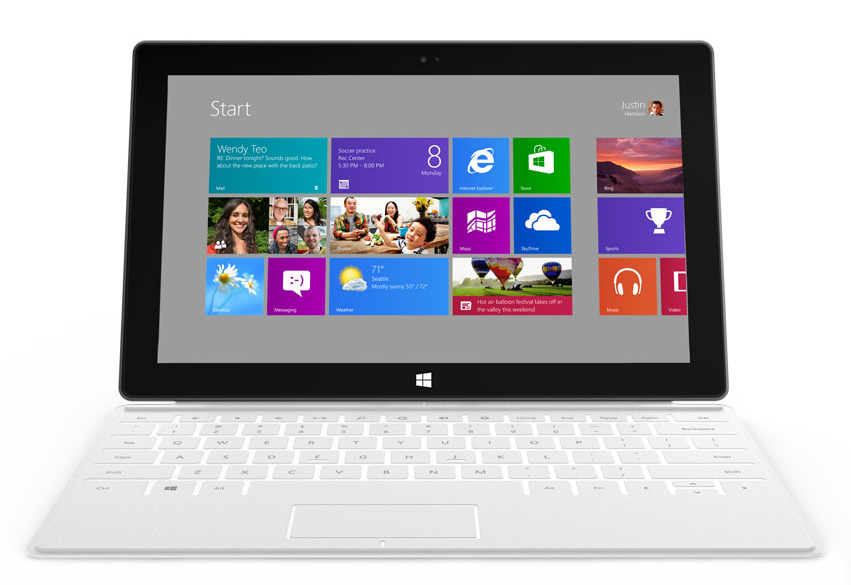
Redmond's upcoming Surface hardware feels stylish, fresh, and exciting. Apple's iPad finally gets some real competition.
By Melissa J. Perenson, PCWorld
Microsoft's Surface Tablets
An in-depth preview of Microsoft's forthcoming Surface RT and Surface Pro tablets.
Microsoft Surface RT vs. Surface Pro: Which Tablet Will You Want? »
How Microsoft Surface Stacks Up Against Its Tablet Competition »
If tablets are the rising stars of personal computing, then Apple’s
iPad burns most brightly. But now, Microsoft is preparing to crash the
party in spectacular fashion with a pair of tablets that represent its
first-ever Windows hardware.
Microsoft wowed the tech-savvy audience, including me, with its
introduction of Surface for Windows RT and Surface for Windows 8 Pro
tablets. (For brevity, I’ll refer to them hereafter as Surface RT and
Surface Pro.)
The folks in Redmond have spared no detail in reconsidering what a
tablet can, and should, be. But what caught our collective attention was
Microsoft’s end-to-end vision, as seen in its design choices. This
wasn’t just another humdrum tablet that Microsoft happened to introduce;
Surface feels stylish, fresh, and exciting.
What Is Surface?
Windows 8: Have two apps on screen at once. Photographs by Melissa J. PerensonFirst
of all, Surface RT runs on Nvidia’s ARM-based Tegra 3 platform and
requires all-new apps that use the Windows 8 “Metro” interface; the Pro
version uses Intel’s Core i5 and runs conventional Windows programs (as
well as Metro apps).
Microsoft says that Surface RT will be available when Windows 8
launches; the OS ships October 26. Surface Pro will follow a few months
later.
In taking the step to sell its own tablet hardware, Microsoft ensures
that a flagship Windows 8 tablet will stand ready to compete against
Apple’s iPad and the army of Google Android tablets, most of which have
failed to find an audience.
Based on Surface’s specs and my hands-on experience with a prototype
of the Surface RT tablet, I expect Microsoft’s entry to leapfrog the
largely undistinguished Android competitors and potentially pose a
threat to Apple’s iPad hegemony.
Surface Impressions
Smooth: Surface has a highly stylized design. First
off, Surface has a striking look. The exterior magnesium alloy surface
is silky smooth to the touch and finely finished; and the tablet feels
solidly built and well balanced, whether held in one hand or two. While I
wish it were slightly slimmer, its angled edges make it fairly
comfortable to hold.
Microsoft’s thoughtful approach to design addresses many shortcomings
common to today’s tablets. For example, rival tablets require you to
buy a case with a kickstand or some other device if you want to prop it
upright to share content or watch a movie; Surface comes with a sturdy
built-in kickstand.
The kickstand is a brilliant stroke of design—a practical yet stylish
flourish we wouldn’t expect from Microsoft. I lifted the tablet up and
held it by the kickstand almost automatically, without considering
potential consequences, but I had nothing to fear: The kickstand’s
unique hinge felt as stable as bedrock. Kickstand: You get a pop-out kickstand, and USB.Another
significant step: For the manufacture of the Surface screen, Microsoft
is using optical bonding, which makes text clearer, minimizes glare, and
improves contrast. Bonding is expensive, so few tablets use it; Google’s 7-inch Nexus 7, Acer’s 10.1-inch Iconia Tab A700, and Barnes & Noble’s 7-inch Nook Tablet
are the three notable exceptions. Based on my time with the 10.6-inch
Surface prototype, the display benefits greatly from Microsoft’s
investment in this pricier process.
The company has also reimagined how tablets could become better
productivity tools, starting with its clever Type Cover and Touch Cover.
Whereas other manufacturers require a separate case with a keyboard or a
dock that turns the tablet into a netbook-like clamshell (see the Asus
Transformer Pad series of Android tablets—the Infinity TF700
is the most recent—or Fujitsu’s Windows 7 Stylistic Q702, due in this
third quarter), Microsoft’s “smart” cover provides the well-integrated
tablet keyboard you’ve dreamed of. Versatile, lightweight, and
functional, the Type Cover has mechanical keys and a multitouch clickpad
to delight touch typists everywhere. The Touch Cover comes in a number
of bright, cheerful colors, as well as the more staid black, and has
flat, pressure-sensitive keys that detect when you are typing. If you
flip the cover around to the back, the built-in accelerometer turns off
the keyboard (a nifty trick). The Touch Cover is thin, just 3mm, and
snaps into place with a sturdy clink, thanks to magnetics and aligning
components that keep it in place. Because of this design, the cover
feels more secure than Apple’s Smart Cover, which can easily slip out of
place.
The Takeaway on the Two Surfaces
Keyboard: An innovative cover attaches to the tablet. The
keyboard options, coupled with the polished design and Windows pedigree
of the tablets, describe devices that could give both existing tablets
and traditional clamshell ultraportable laptops a run for their money.
However, “could” is the operative word here. Until we know more-precise
details about specs and pricing, predicting how well the two Surface
models will compete in the marketplace is largely guesswork.
I do suspect that, initially at least, the Surface RT is unlikely to
be an iPad killer. Microsoft didn’t reveal Surface’s price at the
launch event. Also, apps are paramount to tablet buyers, and consumers
are unlikely to flock to Surface RT until Windows 8 gains compelling
Metro apps.
Surface Pro, meanwhile, will challenge the current crop of laptops
and Ultrabooks—and there it may well win. Why purchase a classic
clamshell-style laptop if you can get a tablet that quickly and
elegantly converts into a laptop when you need one—all without
sacrificing performance, interoperability, or functionality? The big
question is whether consumers can manage with a 10.6-inch display as
their laptop screen; for many, the convenience of a tablet/laptop hybrid
may be worth the downside of viewing content on a smaller screen.
Four Unanswered Questions
Many unknowns are still to be revealed about Surface. The stakes are
high: Market research firm NPD DisplaySearch, for instance, estimates
that by 2016 tablet shipments will exceed laptop shipments. Windows 8
tablets could play a significant role in helping to boost tablet sales.
How Much Will It Cost?
Microsoft didn’t reveal what Surface’s pricing would be at launch;
rather, the company said that the Windows RT version would cost about
the same as comparable tablets, and that the Pro version would target
Ultrabook pricing. Those generalities leave a lot of wiggle room.
Consider the Surface RT, which will have 32GB and 64GB versions. Acer’s Iconia Tab A700, an Android competitor, costs $450 with 32GB of storage; the Asus Transformer Pad Infinity TF700 costs $500, also with 32GB of storage. Apple’s third-generation iPad is $499 for 16GB, and $599 for 32GB. So,
realistically, Surface RT must come in under $500 to be competitive.
And even then, Microsoft will face price-pressure challenges from 7-inch
tablets, including Google’s Nexus 7 ($249 for 16GB) and a rumored
7-inch Apple iPad that, if it does ship, would be priced competitively
with the Nexus 7. Those lower prices will certainly affect what
consumers expect to pay for a tablet, regardless of a larger screen
size.
Pricing is equally unclear for the Surface Pro. Ultrabooks, with
128GB to 320GB of storage, are priced at $750 to $1100; 64GB Windows 7
tablets range from $750 to $1099. If Surface Pro with 64GB can hit $800,
it will be reasonably competitive. After all, Apple’s 64GB iPad costs
$699 today. But if Surface Pro hits $1000 or more, Microsoft’s tablet
may seem too pricey.
What Kind of Battery Life Can We Expect?
The Metro interface on a Surface prototype.At
its launch event, Microsoft declined to offer battery life estimates.
All-day computing remains the holy grail of tablets, and some
competitors are getting closer. For instance, in PCWorld’s
video-playback test, the Apple iPad lasted 10 hours, 46 minutes; the
Google Nexus 7, 10 hours, 10 minutes; the Acer Iconia Tab A700, 8 hours,
11 minutes; and the Asus Transformer Pad Infinity TF700, 7 hours, 58
minutes.
However, even if Surface Pro can’t match those numbers, it needs to
stack up well against Ultrabooks, which average around 6 to 7 hours of
battery life, and existing Windows 7 tablets, which clock in at 4 to 6
hours of battery life.
Microsoft, we hope, has some battery-stretching secrets up its
sleeve. Windows 8 has power-management features to help maximize battery
life by optimizing how apps, the OS, and hardware work together. A
“Connected Standby” mode lets the machine enter a low-power state, while
still receiving updates; and Windows 8 Metro apps are designed to
take advantage of this mode. Today, though, Connected Standby works only
with ARM processors and with Intel’s still-forthcoming system-on-a-chip
processor. Current Intel Ivy Bridge Core i3, i5, and i7 CPUs do not
support Connected Standby.
Will Surface Have 3G/4G Connectivity?
Microsoft hasn’t yet mentioned Surface support of mobile data
options; carrier partnerships may still be in development. Or perhaps
Microsoft will skip integrated mobile broadband for the relative
simplicity of a Wi-Fi-only version. You can, of course, use either
Surface model over Wi-Fi with a mobile hotspot, or with a USB data
dongle, for that matter.
When Can We Buy It?
Surface RT should be available when Windows 8 launches in late
October. The Surface Pro model is scheduled for approximately three
months after the RT version ships, meaning it should be available in
early 2013.
Android users have a powerful, new weapon in the war against unwanted phone calls.
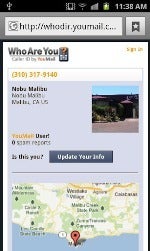
The weapon is in the latest version of the free Android apps, YouMail and WhoAreYou?.
It allows you to "ditch" calls by tapping “menu" and “ditch" on the
viewing pages for any voicemail, hangup or contact. That will prevent
the caller from leaving you messages.
What's more, your phone won't even ring when they call, a feature that's
possible because of the deeper system integration Android apps have
compared to some other operating systems.
But not only is the call blocked and the ring choked, but the app
administers a coup de grace on the call by responding to it with a "this
number is out of service" message. That ruse often works better for
getting your phone number off a telemarketer's list than putting it on
the Do Not Call list.
In addition to the ditch calls feature, YouMail has redesigned its app
's user interface. "Yeah, we know we've sort of sucked in terms of
design," it confessed in a company blog.
It has also improved the app's contact handling, added searching of
voice mails and customized greetings for individual contacts.
The company is also working on integrating the ditch call feature into its iOS version of its app.
Initial reaction appears to be mixed to the new version of YouMail,
which has a user rating of 3.7 out of five stars based on more than 3000
reviews in Google Play.
"Well the look is awesome, the interface superb, but how about the functionality?" asked "DP" at the newly named store. "This version doesn't appear to be connected at all. I dial the code. I hear the beeps. But no YouMail for me."
"When this app first came out for the Android it was absolutely a
wonderful app," wrote "croger." "Now, I am sorry to say it is horrible."
"Been sketchy for a while now," "T." observed. "But the latest update looks like someone has taken the helm again."
"This is THE BEST voicemail program I have ever had," gushed "Roger Hastings." "Loaded with features."
According to YouMail, which estimates it has more than two million users
of its apps, the company is trying to rework traditional telecom
functions and add value to them.
That can sometimes irk old line providers of those services. For
instance, T-Mobile, which provides a visual voice mail service similar
to YouMail's, had YouMail's apps temporarily removed from the Android Market for disrupting its network.
The problem was eventually solved and YouMail's apps were reinstated in the market.
Sidecar Smartphone App: Share Data While Making a Phone Call
When using the Sidecar app for Android- or iOS-based phones,
users can share video, photos, location, and contact information while
making a phone call.
By Ed Oswald, PCWorld
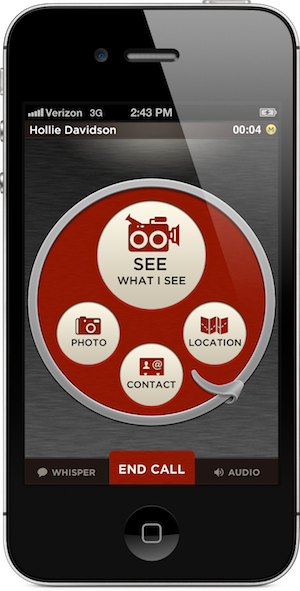
A mock-up of what the Sidecar interface looks likeThere
are a lot of apps out there that allow you to do just about anything
with today’s smartphone, but most of them avoid trying to better the
good old voice call.
That’s not to say anyone has not tried: Apple made waves with its FaceTime video chat, but that only works on iOS and only on W-iFi. Skype and other apps attempted to liven up the voice experience, but they focus on the data side of things first, and the interfaces are often clunky.
Sidecar’s focus is strange considering our phone’s primary function
is to make calls. The Sidecar app duplicates that feature, which could
seem repetitious, However, while in a call, users can share video,
photos, location, and contact information instantly via the app. That’s
Sidecar’s hook.
Take, for example, the process of sharing a picture through Skype.
“It’s twelve clicks,” Sidecar CEO Rob Williams says. Sharing a contact
with someone during a call requires at least five steps on iOS and
Android. In Sidecar that is shortened to two.
Similarly, sharing your location is equally difficult: On both major
operating systems, it can require the user to take up to six or more
steps: Again, only two steps are needed with the Sidecar app. His new
free app called Sidecar wants to change that experience. Here's a video
showing how Sidecar works:
Williams and his San Francisco-based team see an opportunity in voice
that few others have touched. “The calling experience hasn’t changed
much,” he tells PCWorld. “We’re attempting to reimagine the voice call
here.”
How It Works
The Sidecar app interfaceThe
Sidecar app interface looks like an old-style rotary phone. Williams
said developers wanted an interface that was “thumbable,” meaning users
could access the app’ major features while still holding the phone in
one hand.
“We thought really big at first, but were surprised to find users
wanted to do some pretty basic things,” Williams says. The functions
that Sidecar provides are things most smartphones can already do, but
many users might not realize they can because of the learning curve
involved.
Another plus for Sidecar is the fact that all features work on both
3G/4G and Wi-Fi, and regardless of carrier. This makes the app
especially useful to those on CDMA networks like Verizon or Sprint,
where customers cannot use voice and data at the same time. Those users
could see the biggest benefits from an app like Sidecar, although it
requires the caller and the recipient of the call to both have the app.
To lure users in, Sidecar will offer users free calling within the
United States and Canada when using a Wi-Fi connection. If the user
receiving a call does not have Sidecar, the company will send a text
message with instructions on how to download the app after the call is
finished.
Williams says he is aware some may see this as equivalent to spam,
but he figures most will likely be interested in downloading the app to
begin with. “Chances are the caller is going to mention the app during
the call anyway,” he says.
Android App Combines Social Networking, Phone Calls, Analytics
By Nick Barber, IDG News
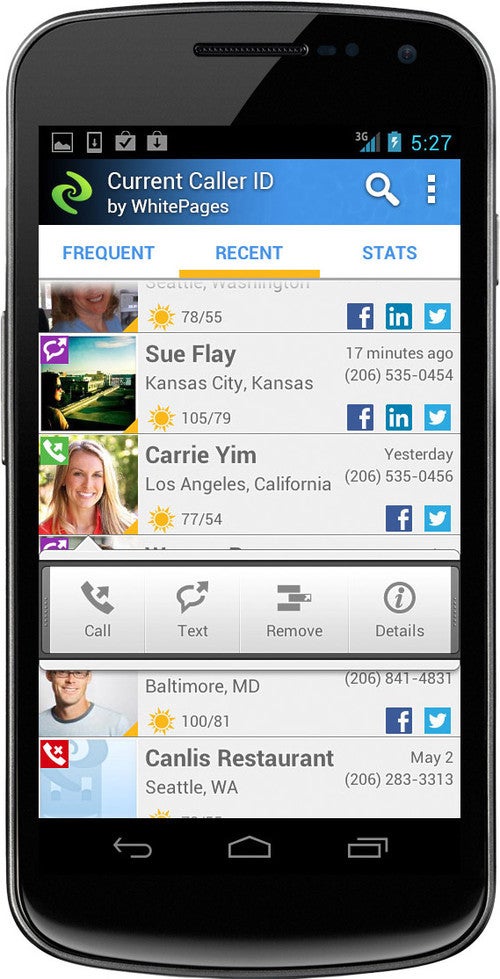
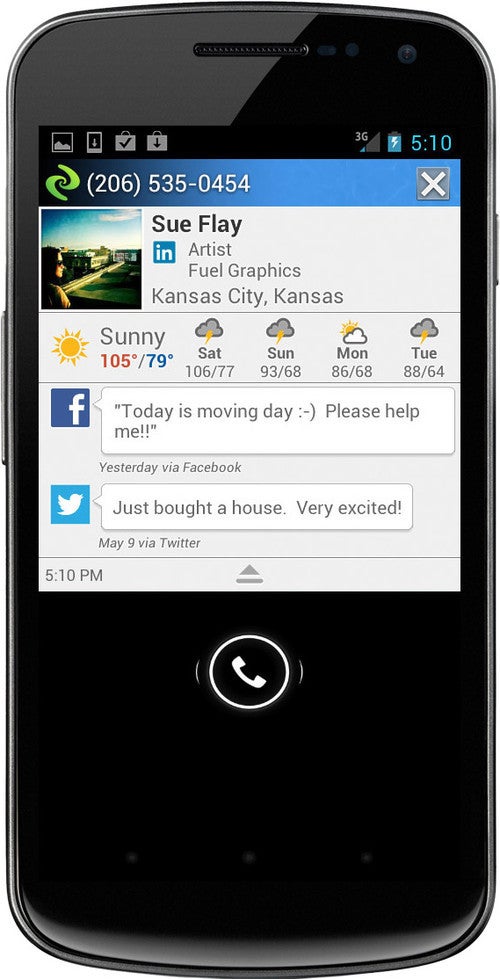
Current Caller ID, a new, free app that launched Wednesday for Android phones, applies social media and analytics to traditional phone calls. For
example, if a person or business calls you and they aren't in your
address book, Current will check the Web for a matching phone number and
display the name on your phone's screen. Sometimes the data didn't
display before I picked up the call, but the app updated it afterward --
the search for a match must have taken longer than it did for me to
pick up the phone.
When you link your Facebook, Twitter or LinkedIn accounts to the app,
it will display callers' latest status updatse or Twitter messages when
they ring you. I found that feature worked pretty consistently.
If you're interested in analyzing your calling and texting habits
with friends, click on the "stats" tab in the app and it will tell you
how you communicate, displaying a pie chart of incoming and outgoing
calls and texts. You can access the statistics for any of your recent
calls.
The stats will also tell you when it's best to text or call your
contact based on your interaction. I found it interesting to see which
friends I text and call more and vice versa, but this information won't
be essential for most users.
I
did run into one problem that I found distracting. When I returned back
to my smartphone after being away, Current Caller ID would alert me
that I missed 26 -- or some other large number -- of calls. It wasn't an
error, because I had missed a number of calls over a period of time,
but not that many since I had last checked my phone. The app should only
have told me how many calls I missed since I last used my phone, rather
than all of the calls I had missed in a few weeks time.
Current Caller ID won't replace your smartphone's default telephone
application or address book. You still need to use your phone's default
app to dial out, but Current will override it for incoming calls.
Tighter integration into the smartphone's default telephone application
would make Current Caller ID more valuable, but overall it was a welcome
addition to my phone and one that I won't delete.
Canon PowerShot G1 X Review: Amazing Photos, Troubling Limitations
If you want the highest photo quality, turn to the 14-megapixel Canon PowerShot G1 X, which in our tests produced the best images we've ever seen from a fixed-lens camera. Even in challenging lighting conditions, it delivers photos that transcend the output from much of the point-and-shoot competition.
At $800 (as of August 6, 2012), the PowerShot G1 X is extremely expensive for a fixed-lens camera, with a price, feature set, and body more in line with an entry-level DSLR body or an interchangeable-lens mirrorless camera. The G1 X's almost-APS-C-size sensor, manual exposure controls, built-in ND filter, RAW capture mode, and compatibility with Canon's external Speedlite flashes are all standout features.
Beyond its jaw-dropping image quality, however, this camera has a few more red flags than any other model in its class. In many ways it's the best fixed-lens camera I've ever used: Its image quality is second to none, its manual controls are well laid out and easy to access, it has a tilt-and-swivel LCD screen to help with odd-angle shots, and its automated shooting modes are useful and perform well.
In other important respects, it's a major letdown: Its minimum focus distance is more than half a foot away from the subject, its autofocus system is slow and buggy compared with those of other premium compacts, it has trouble freezing fast action in its continuous-shooting mode, and its manual focus controls feel like an afterthought—a strange shortcoming for such a manual-oriented camera.
The sum of all those parts is still a great option for experienced photographers or for DSLR owners who want a secondary camera. Whether it's right for you, however, depends a lot on how you plan to use it. For landscapes, portraits, and static subjects, it's a great performer. For macro photography and action photos, it's bound to frustrate you.
Novice photographers may want to steer clear unless they're willing to undergo PowerShot G1 X boot camp. As long as you're a few feet away from a stationary subject, you'll be able to take amazing photos in Auto mode; for the price and for the usability hiccups, though, you might as well buy a DSLR or a mirrorless model.
Performance, Image Quality, and Video Quality
In addition to its extensive manual controls, the Canon PowerShot G1 X has one of the best Auto modes we've seen in a camera. In fact, the camera is slated for induction into the PCWorld Labs hall of fame, as it recorded the first Perfect score we've seen in the category of image sharpness.
In the shots we took for the PCWorld Labs' subjective tests of image quality, the G1 X's images showcased sharp lines and excellent contrast without any evidence of fringing or chromatic aberration. The PowerShot G1 X is no slouch in other areas, either, as it turned in very impressive scores for exposure quality (Superior), color accuracy (Very Good), and lack of distortion (Superior). In image quality, it's probably the best point-and-shoot camera we've ever tested, period.
You can see its excellent output for yourself. To view the full-size photos we used in our subjective tests, click the thumbnail images to the left.
The Canon PowerShot G1 X produces excellent video quality, as well. The camera shoots 1080p video at 24 frames per second (the setting we used for our tests), as well as 720p or 640-by-480-pixel footage at 30 fps. You can use different white balance settings and a few creative effects in video mode, but you won't get the manual exposure or frame-rate controls for video that you'll find in two of this model's premium competitors, thePanasonic Lumix DMC-LX7 and the Sony Cyber-shot DSC-RX100.
The G1 X's test footage impressed our judges, as the camera earned a score of Superior for overall video quality. Video footage we shot with the camera in a well-lit setting looked very sharp, with excellent color fidelity, smooth motion, and fine detail. In our low-light tests, footage looked predictably dark, but had less visual noise and problematic motion handling than the video we've seen from other cameras. Audio pickup through the camera's top-mounted stereo microphones was decent; the sound quality earned a score of Good in our tests. Unfortunately, the camera has no mic-in jack for an external microphone.
You can watch the test clips we used for the PCWorld Labs' subjective evaluations below. Select1080p from the bottom menu in the player for the full-resolution clips.
The PowerShot G1 X is one of a only a few fixed-lens cameras available these days with an eye-level optical viewfinder. The optical viewfinder has some major drawbacks (more on that in the "Hardware and Design" section below), but it will help you squeeze a lot more juice out of its battery if you opt to turn the LCD off. With its LCD on, the PowerShot G1 X is rated for 250 shots per charge of its battery, which puts it in the Good range of our battery-life scores. With the LCD off, the camera is rated at an excellent 700 shots per charge.
Hardware and Design
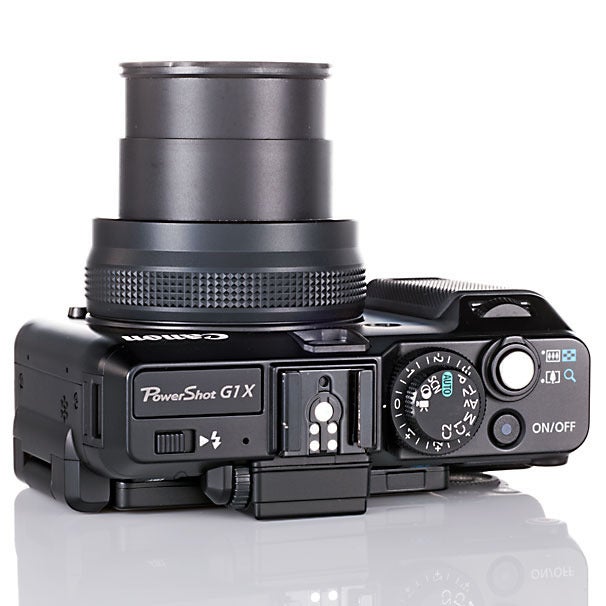
This thing is built like a tank. It feels as sturdy as any camera I've held, and its sheer size is more like that of a smaller DSLR body (without a lens attached) or a mirrorless interchangeable-lens camera. It's nowhere near pocketable, but Canon has used the camera's extra real estate well.
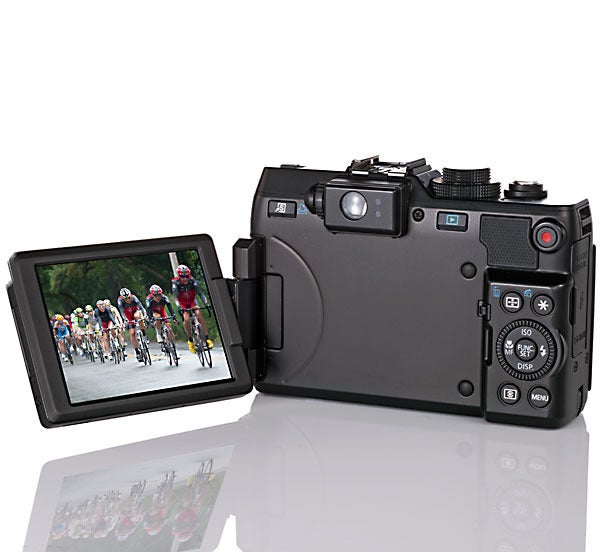
Thanks to the PowerShot G1 X's larger size, the camera has ample room for a comfortable hand grip, sturdy dials and buttons that give you quick access to everything from exposure-compensation adjustments to video recording, a tilt-and-swivel LCD screen, a pop-up flash, and a hot shoe. The circumference of the lens is quite a bit larger than what you'll find on other premium compact cameras, and a removable cap protects the lens.
The G1 X is the first G-series model with a CMOS sensor—and that sensor is the shining star of this camera. The camera's 14-megapixel 1.5-inch-type sensor dwarfs the 1/1.7-inch-type imagers found in most cameras in the premium point-and-shoot class. In the real world, that translates to the excellent image quality we found in our tests, as well as to very good low-light performance for a camera that isn't a DSLR.
The lens's maximum aperture values range from F2.8 on the wide-angle end to F5.8 telephoto, and the camera's shutter speeds range from 1/4000 of a second to a full minute. Despite the camera's relatively narrow F2.8 aperture of 28mm, it still achieves shallow depth-of-field effects when you're shooting subjects at close range.
In addition, the camera's sensor size contributes to standout low-light performance for a fixed-lens camera; the G1 X's ISO equivalency settings reach up to a stunning 12,800, although I had much better results in low-light settings when I used the camera's Handheld Night Scene mode. For a fixed-lens camera, its high-ISO performance is still very good, but you shouldn't expect the kind of performance you'd get from a DSLR at the upper reaches.
The camera's 4X-optical-zoom lens covers a range of 28mm wide-angle to 112mm telephoto, and a 4X digital zoom extends that range to a simulated 448mm on the telephoto end. I should note that at its widest-angle focal length, the lens extends from the camera quite a bit more than the lens of any other fixed-lens camera I've used; this design comes into play when you're using the optical viewfinder.
The PowerShot G1 X's optical viewfinder definitely doesn't live up to DSLR quality. Obviously, it isn't a through-the-lens optical viewfinder; only a DSLR offers that particular feature. And the G1 X's viewfinder does offer a few nifty tricks, such as a field of view that zooms in and out accordingly as you're adjusting the camera's lens.
Nevertheless, the G1 X's viewfinder has two major flaws. First and foremost, framing a shot is difficult when the lens covers up a sizable portion of your field of view, which is exactly what happens when you look through the eyepiece at wide-angle focal lengths: The lens gets in the way of the bottom-left corner of your view. Second, what you see through the eyepiece is always quite different from what you're actually capturing; the lens has a much wider field of view than the viewfinder does, and it's also positioned significantly lower than the eyepiece, which means the viewfinder isn't even useful for basic shot composition.
Luckily, the camera's 3-inch-diagonal, adjustable LCD screen is excellent. You can turn it off and use the viewfinder to save battery life, but you're going to need the LCD if you want an accurate representation of what you're shooting.
Shooting Modes and Features
In 4.5-fps burst mode, some pics came out blurry.The G1 X's secret weapon is Handheld Night Scene mode.ISO ranges up to 12,800, but noise is an issue.Macro mode doesn't let you get very close.When macro works, the depth of field is impressively shallow.When the G1 X cooperates, it takes sharp, great-looking photos.
Without a doubt, the PowerShot G1 X will appeal more to photographers who know their way around manual exposure controls than those who want just a simple point-and-shoot. The features and controls in the PowerShot G1 X include much of what you'll find in a DSLR (RAW mode, an exposure-lock button, a button to adjust the point of focus, aperture- and shutter-priority modes, manual mode, program auto mode, and two custom presets on the mode dial).
You also get a focus-bracketing mode that lets you snap three successive shots at slightly different focal lengths, as well as an exposure-bracketing mode and a built-in neutral density filter that you can switch on and off via the camera's menus. Dedicated dials make adjusting exposure compensation and shutter/aperture values easy.
Although the G1 X is built primarily for seasoned shooters, it has its fair share of beginner-friendly scene modes and filters. As we noted during the PCWorld Labs' image-quality tests, its Auto mode is phenomenal, as long as you're not trying to take an extreme close-up—the autofocus won't cooperate there.
The main drawbacks of this camera are its macro mode, its hit-or-miss autofocus system, its manual focus controls, and its performance in burst mode.
For starters, you'll need to be at least half a foot away from your subject in order to capture a crisp shot, and even then the camera's autofocus system has a tendency to search in and out. In my tests, even when some subjects were about a foot away, the autofocus system didn't settle on a sharp focus at all. For example, I tried to take shots of a bee sitting on a flower from about a foot and a half away. I never did get the shot, as the autofocus system refused to lock in on the bee, and the bee had flown away by the time I switched to manual focus mode. With that in mind, expect to take a few wider-angle shots and to do some image cropping if you want a very tight close-up of an insect, a flower, or any other common macro subject.
For a high-end camera, the PowerShot G1 X has lackluster manual focus controls, as well. You can't choose manual focus in Auto mode (although you can in Program Auto mode), which means you're stuck with whatever the AF system selects for you. What's more, you have to fine-tune the focus by using the camera's back-mounted scrollwheel, which feels a bit too tacked on for a camera with so many manual controls. For adjusting focus, the G1 X would have benefited greatly from a lens-barrel control ring like the one on theCanon PowerShot S100.
On a positive note, some real gems are hidden in the camera's creative filters and scene mode menus. I can't say enough about the G1 X's Handheld Night Scene mode, which is the best option for capturing crisp, well-exposed shots in the dark without a flash. You'll also find an automatic three-shot HDR mode, a miniature mode that simulates the effects of a tilt-shift lens, and the excellent Color Accent mode, which lets you isolate a single color in a black-and-white shot.
Also useful are the G1 X's in-camera panorama stitching scene mode and its 4.5-fps burst mode, although the latter has its problems. Again, autofocus speeds are the issue, as moving objects can still look like a blur.
Also in the mix are a few more-gimmicky settings, such as a fish-eye-lens simulator, a toy-camera mode, and color filters; any photographer skilled enough to be interested in the G1 X would be more likely to add those kinds of effects with an editing tool (or not at all).
In video mode, you can apply the Color Accent and miniature filters (the latter at a maximum frame rate of 6 fps at 720p resolution), but this isn't the quietest camera when zooming in and out. The camera has a built-in wind filter that reduces some ambient noise while filming, but you'll hear the lens motors in your footage if you zoom in and out while recording.
Bottom Line
You simply won't find better all-around image quality from a fixed-lens camera. When you can get the Canon PowerShot G1 X to cooperate, it takes tack-sharp, great-looking photos. Thanks to its physical knobs and buttons, and its larger-than-most body size, it's as close as a camera comes to a DSLR without offering interchangeable lenses.
However, this camera is far from a must-buy, since $800 is a lot to pay for a fixed-lens camera, not to mention one with the G1 X's shortcomings. The camera's macro capabilities, autofocus speeds, continuous-shooting performance, and optical viewfinder are all subpar.
All in all, $800 gets you the best fixed-lens camera for portraits, landscapes, and sharp shots at night if you use its Handheld Night Scene mode. Nothing's perfect, of course, but if Canon fixes the macro mode and the continuous-shooting performance in the PowerShot G1 X's successor, it will come pretty darn close.